When Does useEffect Really Run?
useEffect does not run during render. Learn why effects fire after paint, why cleanup logs the old value, and how closures make that sequence predictable.
If you have been working with React, try to guess the console output of this component — first on the initial load, then after the user clicks the button once:
1function App() {
2  const [count, setCount] = useState(0);
3
4  useEffect(() => {
5    console.log("Effect:", count);
6
7    return () => {
8      console.log("Cleanup:", count);
9    };
10  }, [count]);
11
12  console.log("Rendering");
13
14  return <button onClick={() => setCount(count + 1)}>{count}</button>;
15}
Without running the code, what do you think the initial console logs will be, and what will appear after the user clicks the button once?
Here is the actual output:
1Rendering
2Effect: 0
3Rendering
4Cleanup: 0
5Effect: 1
It looks a bit weird at first, right? Let’s dig into how useEffect actually works so this starts
making sense.
When does useEffect really run?
If you remember from the previous post where we
looked at how React turns your component into work, React does not run the effect during the render
phase. It only registers the effect while the component is rendering. The actual function you
passed to useEffect is attached to the component’s Fiber and scheduled to run later — specifically
after the browser has painted the DOM.
Why after paint and not during render? Imagine if the effect ran while React was still calculating the next UI. Take a common case:
useEffect(() => {
  fetch("/api/users");
}, []);
If this fetch happened in the middle of rendering, everything would wait for the network request. The DOM would not be ready, the user would see a blank or frozen screen, and the whole app would feel blocked. Even if somehow the render continued, the API response would update state, forcing React to start the whole process again. That is a terrible experience.
Or consider this:
useEffect(() => {
  setCount((c) => c + 1);
});
If the effect ran during render, the state update would trigger another render, which would run the effect again, which would update state again… infinite loop. React protects you from this by delaying the effect until after the browser has already shown the latest UI to the user.
From the user’s point of view this is much better. The screen updates first, then the side effects (logging, fetching, subscriptions, etc.) happen quietly in the background.
So the order is roughly:
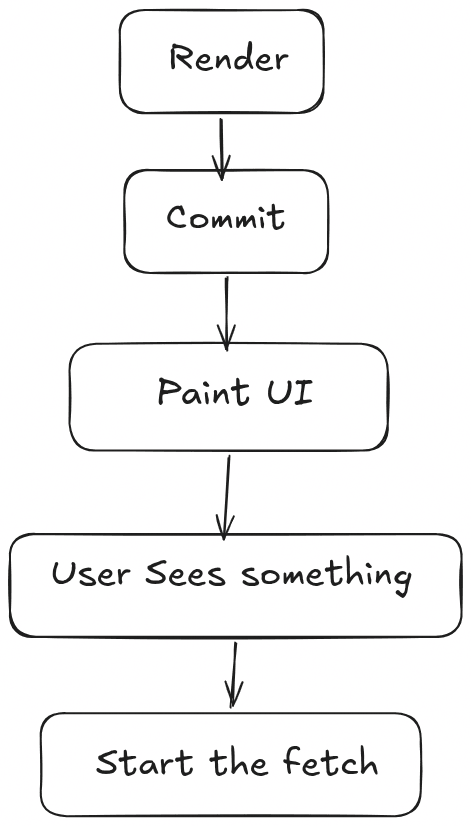
- Render — React calculates the UI and registers the effect.
- Paint — the browser shows the latest DOM to the user.
- Cleanup — if a previous effect exists, its cleanup runs first.
- Effect — the new effect function finally runs.
That is why on the very first load you see:
Rendering
Effect: 0
The component renders with count = 0, the browser shows the button with 0, and only then does
the effect run and log Effect: 0.
Cleanup functions
Look again at the code. Inside the effect there is a returned function:
return () => {
  console.log("Cleanup:", count);
};
This is the cleanup function. Its job is simple: clean up whatever the previous effect set up before
React runs the effect again (or before the component unmounts). Classic examples are
clearInterval, clearTimeout, removing event listeners with window.removeEventListener,
cancelling a fetch, or unsubscribing from a store.
Cleanup does not run on the initial mount. There is nothing to clean up yet. It only runs in two situations:
- Right before the effect runs again (because a dependency changed)
- Right before the component is removed from the tree
That is why after the user clicks the button you see this sequence:
Rendering
Cleanup: 0
Effect: 1
When the button is clicked, count becomes 1. React re-renders the component (you see
Rendering), then it needs to run the effect again because count is in the dependency array. But
first it runs the cleanup from the previous effect, and only after that does it run the new effect.
Why does cleanup log the old value?
This is the part that confuses a lot of people. Why Cleanup: 0 and not Cleanup: 1?
When React creates an effect, it builds a small object that looks conceptually like this:
1Effect {
2  create: () => { ... },   // the function you passed to useEffect
3  deps: [count],
4  cleanup: () => { ... }   // the function you returned
5}
Both the create function and the cleanup function close over the values that existed at the
moment the effect was created. On the first render, count was 0, so both the effect and its
cleanup captured count = 0.
Later, when React needs to clean up, it still calls that old cleanup function — the one that
closed over 0. The new effect (which will log Effect: 1) is a completely separate function that
closes over the new value.
This is why cleanup always “sees” the previous render’s state and props. It is not a bug; it is how closures work, and React relies on it so that cleanup can correctly undo whatever the previous effect did.
Putting it all together
On initial mount:
- Component renders →
Rendering - Browser paints
- Effect runs →
Effect: 0 - Cleanup is stored for later (but not run yet)
After the click:
- State updates to
1 - Component renders again →
Rendering - Browser paints the new UI
- Previous cleanup runs →
Cleanup: 0(still closed over the old value) - New effect runs →
Effect: 1
Once you see the sequence as render → paint → cleanup (if any) → effect, the console output stops looking mysterious.
A few practical tips
A few practical tips that follow from this:
- Always put values that the effect uses in the dependency array (or use the functional form of
setStateif you only need the previous value). - If you set up something that needs cleaning (timers, listeners, subscriptions), always return a cleanup function. Leaving them hanging is a common source of memory leaks and weird bugs.
- In React Strict Mode (the default in development), React intentionally runs effects twice on mount
to help you catch missing cleanups. You will see extra
EffectandCleanuplogs in development that disappear in production. This is normal and helpful once you know why it happens.
Understanding when the effect runs, why it is delayed until after paint, and how cleanup closes over the previous values is one of those foundational pieces that makes a lot of other React behavior click into place.