Why Calling setCount Three Times Doesn't Add Three in React
React batches state updates and uses snapshots inside event handlers. Learn why setCount(count + 1) three times yields 1, and how functional updaters fix it.
If you have been working with React, then you might already know the answer to this:
1function App() {
2  const [count, setCount] = useState(0);
3
4  function handleClick() {
5    setCount(count + 1);
6    setCount(count + 1);
7    setCount(count + 1);
8  }
9
10  return (
11    <div>
12      <button onClick={handleClick}>Click me</button>
13      <p>{count}</p>
14    </div>
15  );
16}
Try to guess the value of count when the user clicks the button once.
If you are new to React or JavaScript, or if you came from another language (Java, Python, C++, etc.), your first answer is probably 3. In almost every other programming language that would be correct. But React works differently. To understand why, we need to look a little under the hood.
What actually happens when you call setCount
When the user clicks the button, React does not update the state immediately. Instead, it schedules
an update and pushes it into a queue. The crucial detail is that when React queues the update, it
takes a snapshot of the current state at that moment. In our example the snapshot is 0.
React batches all state updates that happen inside the same event handler. So the three calls above are not executed one after another right away. They get collected and the queue ends up looking roughly like this:
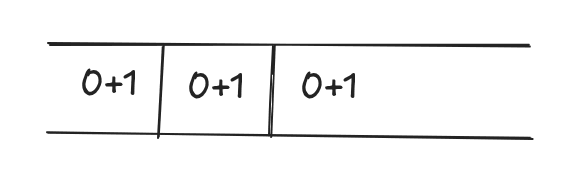
setCount(0 + 1);
setCount(0 + 1);
setCount(0 + 1);
Every single update is calculated from the same original snapshot (0). When React later processes
the queue during the render phase, it applies them one by one, but each calculation still starts
from 0. That is why after one click the count becomes 1, not 3.
This behavior is intentional. By batching updates, React can avoid re-rendering the component three separate times. It collects everything, calculates the final state once, and then re-renders only once. That is a big performance win, especially in larger components.
A simplified look at the phases
Under the hood the process looks something like this:
- Event happens — the click handler runs.
- Schedule update — React pushes each
setCountinto a queue and captures the current state snapshot. - Render phase — React processes the queue, calculates the next state, and decides what needs to re-render.
- Commit phase — React actually updates the DOM with the new state.
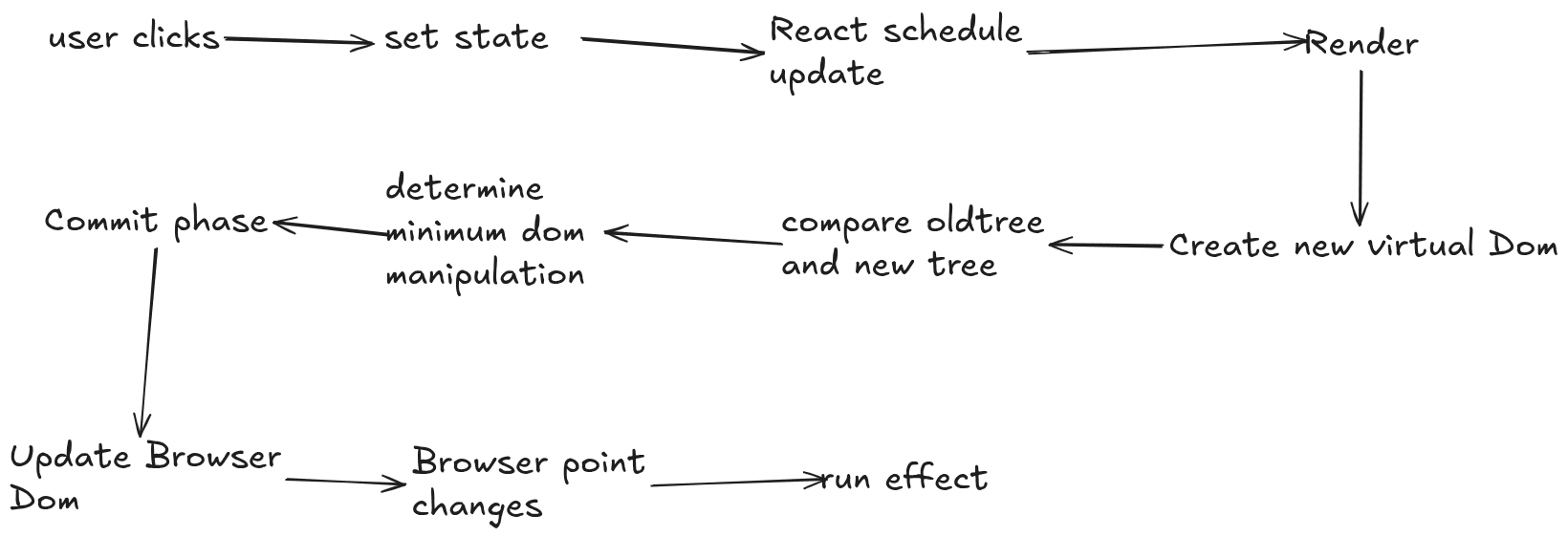
The key takeaway is that the state value you see inside the event handler is the value from the
beginning of that event, not the value after previous setCount calls in the same handler.
How to fix it — use the functional updater
In most cases you should avoid updating the same piece of state multiple times in one event. But sometimes you genuinely need to. The correct way is to pass an updater function instead of a direct value:
setCount((c) => c + 1);
setCount((c) => c + 1);
setCount((c) => c + 1);
Now the count correctly becomes 3.
Why does this work?
When you pass a normal value (or an expression that uses count), React stores the
already-calculated number in the queue. That number is based on the snapshot. When you pass a
function, React stores the function itself. Later, while processing the queue, React calls each
function and always gives it the most recent state value. So the second updater receives the result
of the first one, the third receives the result of the second, and so on.
This is the recommended pattern whenever your new state depends on the previous state.
The important pattern to remember
There is a clear rule:
- Pass a value or an expression that uses the current state variable → React uses the snapshot from the moment the event started and simply replaces the state with that value.
- Pass an updater function (
prev => ...) → React runs the function later and always works with the latest state.
Let’s look at a mixed example so this really sticks:
setCount(count + 10); // uses snapshot
setCount((c) => c + 1); // functional updater
setCount(count + 1); // uses snapshot again
What do you think the final count will be after one click? Many people say 12. The real answer is 1. Here’s why:
count + 10→ snapshot is0→ queues10c => c + 1→ takes the previous result (10) → becomes11count + 1→ again uses the original snapshot (0) → queues1
The last update overwrites everything that came before it. Final value: 1.
React 18 automatic batching
In React 17 and earlier, batching only happened inside React event handlers (like onClick).
Updates inside setTimeout, promises, or native event listeners were not batched. React 18 changed
this — almost all updates are now batched automatically, even in timeouts and promises. This makes
the behavior more consistent, but it also means the “stale snapshot” problem can appear in more
places than before.
When you should always use the functional form
- When the new state depends on the previous state (
count + 1,count * 2, toggling a boolean, etc.) - When you have multiple updates in the same function
- When the update happens inside a loop or after an asynchronous operation
- When you are not 100% sure the current
countvariable is still fresh
A quick tip for debugging
If you ever see a state value that “should have” updated but didn’t, the first thing to check is
whether you used a direct value instead of an updater function. Adding a simple console.log inside
the updater can also help you see exactly what value React is working with:
1setCount((c) => {
2  console.log("Previous value:", c);
3  return c + 1;
4});
One more common case — updating objects or arrays
The same rule applies when your state is an object or array. Always prefer the functional form if the new value depends on the old one:
setUser((prev) => ({ ...prev, name: "New Name" }));
setItems((prev) => [...prev, newItem]);
This protects you from accidentally overwriting other properties or losing previous items because of a stale snapshot.
React’s batching and snapshot behavior is one of those things that feels strange at first, especially if you come from other languages. Once you understand that:
- Updates inside an event are collected into a queue,
- Direct values use the state from the beginning of the event, and
- Updater functions always receive the latest state,
…the behavior stops being mysterious and becomes predictable.
Use the functional updater whenever the next state depends on the previous one, and you will avoid a whole class of subtle bugs.